I'll be reviving http://cg-soft.com and also getting new business cards.
Too busy?
Tuesday, September 10, 2013
Saturday, September 7, 2013
I got the #AutoAwesome treatment
Google has something called #autoawesome, which looks at everything you upload and figures out something in common.
In this case it combined my graphics from the previous post into an animated gif. It worked out quite nicely:
Thursday, September 5, 2013
Treating Environments Like Code Checkouts
In our business, the term "environment" is rather overloaded. It's used in so many contexts that just defining what an environment is can be challenging. Let's try to feel out the shape...
We are in business providing some sort of service. We write software to implement pieces of the service we're offering. This software needs to run someplace. That someplace is the environment.
In traditional shrink wrap software, the environment was often the user's desktop, or the enterprise's data center. The challenge then was to make our software be as robust as possible in hostile environments over which we had little control.
The next step on the evolutionary ladder was the appliance. Something we could control to some extent, but it still ends up sitting on a location and in a network outside our control.
The final step is software as a service, where we control all aspects of the hosts running our applications.
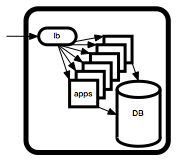
From a build and release perspective, what matters is what we can control. So it makes sense to define an environment as a set of hardware and software assembled for the purpose of running our applications and services.
A typical environment for a web service might look like the diagram on the right.
So an environment is essentially:
When we develop new versions of our software, we would like to test it someplace before we inflict it on paying customers. One way to do that is the create environments in which the new version can be deployed and tested.
A big concern is how faithfully our testing environment will emulate the actual production environment. In practice, the answer varies wildly.
In the shrink wrap world, it is common to maintain a whole bank of machines and environments, hopefully replicating the majority of the setups used by our customers.
In the software as a service world, the issue is how well we can emulate our own production environment. For large scale popular services, this can be very expensive to do. There are also issues around replicating the data. Often, regulatory requirements and even common sense security requirements preclude making a direct copy of personally identifiable data.
This being said, modern virtualization and volume management addresses many of the issues encountered when attempting to duplicate environments. It's still not easy, but it is a lot easier than it used to be.
If you have the budget, it is very worthwhile to automate the creation of new environments as clones of existing ones at will. If you can at least achieve this for 5-7 environments, you can adopt an iterative refinement process, very similar to the way you manage code in version control systems.
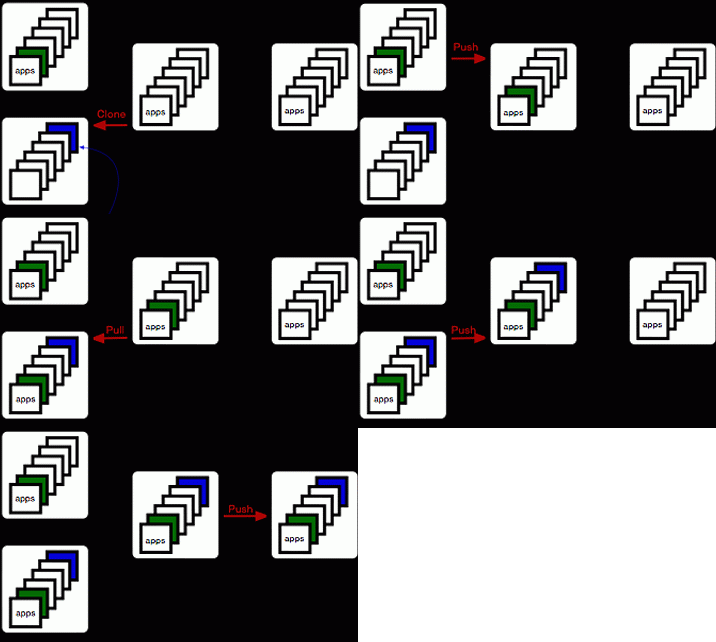
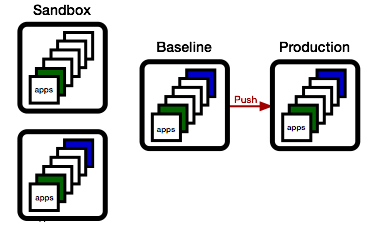
We start by cloning our existing production environment to create a new release candidate environment. This one will evolve to become our next release.
To update a set of apps, we first again clone the release candidate environment, creating a sandbox environment to test both the deploy process and the resulting functionality.
Then, we deploy one or more updated applications, freshly built from our continuous build service (aka Jenkins, TeamCity, or other).
The technical details on how the deploy happens are important, but not the central point here. I first want to highlight the workflow.
Now, let's suppose a different group is working on a different set of apps at the same time.
They will want to do the same: create their own sandbox environment by cloning the release candidate environment, then adding their new apps to it.
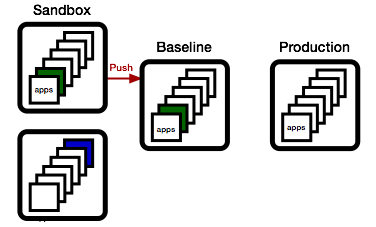
Meanwhile, QA has been busy, and the green app has been found worthy. As a consequence, we promote the sandbox environment to the release candidate environment.
We can do this because none of the apps in the current release candidate are newer than the apps in the sandbox.
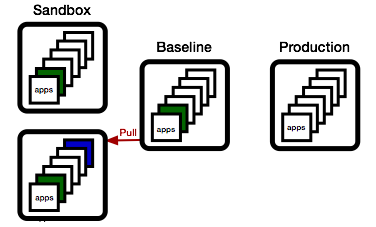
Now, if the blue team wishes to promote their changes, they first need to sync up. They do this by updating their sandbox with all apps in the baseline that are newer than the apps they have.
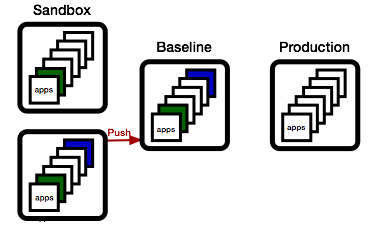
... and if things work out, they can then promote their state to the baseline.
This process should feel very familiar. It's nothing else but the basic change process as we know it from version control systems, just applied to environments:
We are in business providing some sort of service. We write software to implement pieces of the service we're offering. This software needs to run someplace. That someplace is the environment.
In traditional shrink wrap software, the environment was often the user's desktop, or the enterprise's data center. The challenge then was to make our software be as robust as possible in hostile environments over which we had little control.
The next step on the evolutionary ladder was the appliance. Something we could control to some extent, but it still ends up sitting on a location and in a network outside our control.
The final step is software as a service, where we control all aspects of the hosts running our applications.

From a build and release perspective, what matters is what we can control. So it makes sense to define an environment as a set of hardware and software assembled for the purpose of running our applications and services.
A typical environment for a web service might look like the diagram on the right.
So an environment is essentially:
Hardware
OS
Third Party Tools
Our Apps
+ Configuration
====================
Environment
In the shrink wrap world, it is common to maintain a whole bank of machines and environments, hopefully replicating the majority of the setups used by our customers.
In the software as a service world, the issue is how well we can emulate our own production environment. For large scale popular services, this can be very expensive to do. There are also issues around replicating the data. Often, regulatory requirements and even common sense security requirements preclude making a direct copy of personally identifiable data.
This being said, modern virtualization and volume management addresses many of the issues encountered when attempting to duplicate environments. It's still not easy, but it is a lot easier than it used to be.
If you have the budget, it is very worthwhile to automate the creation of new environments as clones of existing ones at will. If you can at least achieve this for 5-7 environments, you can adopt an iterative refinement process, very similar to the way you manage code in version control systems.
We start by cloning our existing production environment to create a new release candidate environment. This one will evolve to become our next release.
To update a set of apps, we first again clone the release candidate environment, creating a sandbox environment to test both the deploy process and the resulting functionality.
Then, we deploy one or more updated applications, freshly built from our continuous build service (aka Jenkins, TeamCity, or other).
The technical details on how the deploy happens are important, but not the central point here. I first want to highlight the workflow.
Now, let's suppose a different group is working on a different set of apps at the same time.
They will want to do the same: create their own sandbox environment by cloning the release candidate environment, then adding their new apps to it.
Meanwhile, QA has been busy, and the green app has been found worthy. As a consequence, we promote the sandbox environment to the release candidate environment.
We can do this because none of the apps in the current release candidate are newer than the apps in the sandbox.
Now, if the blue team wishes to promote their changes, they first need to sync up. They do this by updating their sandbox with all apps in the baseline that are newer than the apps they have.
... and if things work out, they can then promote their state to the baseline.
... and if the baseline meets the release criteria, we push to production.
Note that at this point, the baseline matches production, and we can start the next cycle, just as described above.This process should feel very familiar. It's nothing else but the basic change process as we know it from version control systems, just applied to environments:
- We establish a baseline
- We check out a version
- We modify the version
- We check if someone else modified the baseline
- If yes, we merge from the baseline
- We check in our version.
- We release it if it's good.
Tuesday, August 20, 2013
Dear Reader...
Hello there!
There aren't that many of you, so thanks to those who took the time to come.
I've been wondering what I can do to make this more interesting. Looking at the stats, it does appear that meta-topics are most popular:
That is interesting, since I would have thought that more detailed "how to" articles would be better.
Another thing I wonder about is the lack of direct response. Partly, that's because there just aren't that many folks interested in the topic, but maybe it's also the presentation.
I find that the most difficult part of my job isn't the technical aspect, it's the communication aspect. I often oscillate between saying things that are obvious and trivial, and saying things that have more controversy hidden that it appears at first, and people often only realize at implementation time what the ultimate effect of a choice is.
An important motivation for this blog is to practice finding the right level, so feedback is always appreciated.
... and yes, I need to post more stuff ...
There aren't that many of you, so thanks to those who took the time to come.
I've been wondering what I can do to make this more interesting. Looking at the stats, it does appear that meta-topics are most popular:
Another thing I wonder about is the lack of direct response. Partly, that's because there just aren't that many folks interested in the topic, but maybe it's also the presentation.
I find that the most difficult part of my job isn't the technical aspect, it's the communication aspect. I often oscillate between saying things that are obvious and trivial, and saying things that have more controversy hidden that it appears at first, and people often only realize at implementation time what the ultimate effect of a choice is.
An important motivation for this blog is to practice finding the right level, so feedback is always appreciated.
... and yes, I need to post more stuff ...
Sunday, July 21, 2013
Major Version Numbers can Die in Peace
Here's a nice bikeshed: should the major version number go into the package name or into the version string?
A very nice explanation of how this evolved: http://unix.stackexchange.com/questions/44271/why-do-package-names-contain-version-numbers
Even though it is theoretically possible to install multiple versions of the same package on the same host, in practice this adds complications. So even though rpm itself will happily install multiple versions of the same package, most higher level tools (like yum, or apt), will not behave nicely. Their upgrade procedures will actively remove all older versions whenever a newer one is installed.
The common solution is to move the major version into the package name itself. Even though this is arguably a hack, it does express the inherent quality of incompatibility when doing a major version change to a piece of software.
According to the semantic versioning spec, a major version change:
Note that you can make different choices. A very common choice is to maintain a policy of always preserving compatibility to the previous version. This gives every consumer the time to upgrade.
In either case, there is no need to keep the major version number in the version string. If you're a good citizen and always maintain backwards compatibility, your major version is stuck at "1" forever, not adding anything useful - and if you change the package name whenever you do break backwards compatibility, you don't need it anyways...
So, how about finding a nice funeral home for the major version number?
A very nice explanation of how this evolved: http://unix.stackexchange.com/questions/44271/why-do-package-names-contain-version-numbers
Even though it is theoretically possible to install multiple versions of the same package on the same host, in practice this adds complications. So even though rpm itself will happily install multiple versions of the same package, most higher level tools (like yum, or apt), will not behave nicely. Their upgrade procedures will actively remove all older versions whenever a newer one is installed.
The common solution is to move the major version into the package name itself. Even though this is arguably a hack, it does express the inherent quality of incompatibility when doing a major version change to a piece of software.
According to the semantic versioning spec, a major version change:
Major version X (X.y.z | X > 0) MUST be incremented if any backwards incompatible changes are introduced to the public APIA new major version will break non-updated consumers of the package. That's a big deal. In practice, you will not be able to perform a major version update without some form of transition plan, during which both the old and the new version must be available.
Note that you can make different choices. A very common choice is to maintain a policy of always preserving compatibility to the previous version. This gives every consumer the time to upgrade.
In either case, there is no need to keep the major version number in the version string. If you're a good citizen and always maintain backwards compatibility, your major version is stuck at "1" forever, not adding anything useful - and if you change the package name whenever you do break backwards compatibility, you don't need it anyways...
So, how about finding a nice funeral home for the major version number?
Friday, July 5, 2013
What's a Release?
I recently stumbled over the ITIL (Information Technology Infrastructure Library), a commercial IT certification outfit which charges 4 figure fees for a variety of "training modules", with a dozen or so required to earn you a "master practitioner" title...
Their definition of a release is:
Obviously, when viewing a succession of releases, it makes a lot of sense to talk about deltas and changes, but that is a consequence of producing many releases and not part of the definition of a single release.
A release is a snapshot, not a process. The question should be: "what is it that distinguishes the specific snapshot we call a release from any other snapshot taken from our software development history?"
The main point is that the release snapshot has been validated. A person or a set of people made the call and said it was good to go. That decision is recorded, and the responsibility for both the input into the decision and the decision itself can be audited.
In theory, every release should be considered as a whole. In practice, performing complete regression testing on every release is likely to be way too expensive for most shops. This is the reason for emphasizing the incremental approach in many release processes.
There is nothing wrong with making this optimization as long as everyone does it in full awareness that it really is a shortcut. Release managers need to consider the following risk factors when making this tradeoff between speed and precision:
The ITIL discussion about packaging really means that a release is published, released out of the direct control of the stakeholders.
Incorporating these two facets results in my version of the definition of a release as:
Their definition of a release is:
A Release consists of the new or changed software and/or hardware required to implement approved changes. Release categories include:Even though this definition does pretty much represent a consensus impression of the nature of a release, I think the definition, besides being too focused on implementation details, places too much emphasizes on "change".Releases can be divided based on the release unit into:
- Major software releases and major hardware upgrades, normally containing large amounts of new functionality, some of which may make intervening fixes to problems redundant. A major upgrade or release usually supersedes all preceding minor upgrades, releases and emergency fixes.
- Minor software releases and hardware upgrades, normally containing small enhancements and fixes, some of which may have already been issued as emergency fixes. A minor upgrade or release usually supersedes all preceding emergency fixes.
- Emergency software and hardware fixes, normally containing the corrections to a small number of known problems.
- Delta release: a release of only that part of the software which has been changed. For example, security patches.
- Full release: the entire software program is deployed—for example, a new version of an existing application.
- Packaged release: a combination of many changes—for example, an operating system image which also contains specific applications.
Obviously, when viewing a succession of releases, it makes a lot of sense to talk about deltas and changes, but that is a consequence of producing many releases and not part of the definition of a single release.
A release is a snapshot, not a process. The question should be: "what is it that distinguishes the specific snapshot we call a release from any other snapshot taken from our software development history?"
The main point is that the release snapshot has been validated. A person or a set of people made the call and said it was good to go. That decision is recorded, and the responsibility for both the input into the decision and the decision itself can be audited.
In theory, every release should be considered as a whole. In practice, performing complete regression testing on every release is likely to be way too expensive for most shops. This is the reason for emphasizing the incremental approach in many release processes.
There is nothing wrong with making this optimization as long as everyone does it in full awareness that it really is a shortcut. Release managers need to consider the following risk factors when making this tradeoff between speed and precision:
- Do I really know all the dependencies in order to evaluate the effect of a single change?
- Do I really understand all the side effects?
- Do all the stakeholders understand and agree with the risk assessment?
The ITIL discussion about packaging really means that a release is published, released out of the direct control of the stakeholders.
Incorporating these two facets results in my version of the definition of a release as:
A validated snapshot published to a point of production with a commitment by the stakeholders to not roll back.I think this captures the essence better:
- A release is a state, not a change.
- A release represents a commitment by the stakeholders.
- A release is published, which really means it has escaped the from the control of the stakeholders. Outsiders will see what is, and there is nothing the stakeholders can do about it.
Saturday, June 1, 2013
Mission Creep
I just discussed a simple perishable lock service, and of course the usual thing happens: mission creep.
It turns out QA wants to enforce "code freeze", aka no more deploys to certain test environments where QA is doing their thing.
At first, besides being a reasonable requests, it is amazingly easy to add on to the code. Instead of setting the expiration date to "now", we set it to some user specified time, possible way into the future.
But we are planting the seeds of doom....
Remember the initial assumptions of "perishable" locks... that is they are perishable.
In other words, we assume that the lock requester (usually a build process) is the weak link in the chain, and is more likely to die than the lock manager. And since ongoing builds essentially act as a watchdog for the lock manager (i.e. if builds fail because the lock manager crashed, folks will most certainly let me know about it), I can be relatively lax and skimp on things like persisting the queue state. If the lock manager crashes, so what: some builds will fail, somebody is going to complain, I fix and restart the service, done.
But now suddenly, QA will start placing locks with an expiration date far into the future. Now, if the lock manager crashes, it's not obvious anyone will notice immediately. Even if someone notices, it's not clear they will be aware of the state it was in prior to the crash, so there is a real risk of invalidating weeks of QA work.
So, what am I to do?
So what would you do?
It turns out QA wants to enforce "code freeze", aka no more deploys to certain test environments where QA is doing their thing.
At first, besides being a reasonable requests, it is amazingly easy to add on to the code. Instead of setting the expiration date to "now", we set it to some user specified time, possible way into the future.
But we are planting the seeds of doom....
Remember the initial assumptions of "perishable" locks... that is they are perishable.
In other words, we assume that the lock requester (usually a build process) is the weak link in the chain, and is more likely to die than the lock manager. And since ongoing builds essentially act as a watchdog for the lock manager (i.e. if builds fail because the lock manager crashed, folks will most certainly let me know about it), I can be relatively lax and skimp on things like persisting the queue state. If the lock manager crashes, so what: some builds will fail, somebody is going to complain, I fix and restart the service, done.
But now suddenly, QA will start placing locks with an expiration date far into the future. Now, if the lock manager crashes, it's not obvious anyone will notice immediately. Even if someone notices, it's not clear they will be aware of the state it was in prior to the crash, so there is a real risk of invalidating weeks of QA work.
So, what am I to do?
- Ignore the problem (seriously: there is a risk balance that can be theoretically computed: the odds of a lock manager crash (which increases, btw, if you add complexity) vs the cost of QA work lost).
- Implement persistence of the state (which suddenly adds complexity and increases the probability of failure - simplest example being: "out of disk space")
- Pretend QA is just another build, and maintain a keep-alive process someplace.
So what would you do?
Subscribe to:
Comments (Atom)