Saturday, June 1, 2013

Mission Creep

I just discussed a simple perishable lock service, and of course the usual thing happens: mission creep.

It turns out QA wants to enforce "code freeze", aka no more deploys to certain test environments where QA is doing their thing.

At first, besides being a reasonable requests, it is amazingly easy to add on to the code. Instead of setting the expiration date to "now", we set it to some user specified time, possible way into the future.

But we are planting the seeds of doom....

Remember the initial assumptions of "perishable" locks... that is they are perishable.

In other words, we assume that the lock requester (usually a build process) is the weak link in the chain, and is more likely to die than the lock manager. And since ongoing builds essentially act as a watchdog for the lock manager (i.e. if builds fail because the lock manager crashed, folks will most certainly let me know about it), I can be relatively lax and skimp on things like persisting the queue state. If the lock manager crashes, so what: some builds will fail, somebody is going to complain, I fix and restart the service, done.

But now suddenly, QA will start placing locks with an expiration date far into the future. Now, if the lock manager crashes, it's not obvious anyone will notice immediately. Even if someone notices, it's not clear they will be aware of the state it was in prior to the crash, so there is a real risk of invalidating weeks of QA work.

So, what am I to do?
  • Ignore the problem (seriously: there is a risk balance that can be theoretically computed: the odds of a lock manager crash (which increases, btw, if you add complexity) vs the cost of QA work lost).
  • Implement persistence of the state (which suddenly adds complexity and increases the probability of failure - simplest example being: "out of disk space")
  • Pretend QA is just another build, and maintain a keep-alive process someplace.
The last option appears attractive, as it will not require modifying the lock service itself, but truth be told, it is simply moving the complexity of the problem elsewhere. Now you need to worry about keeping the keep-alive process alive... fun fun...

So what would you do?

Wednesday, May 29, 2013

Annotating Git History

As is well known, git history is sacred. There are good reasons for it, but it does make it difficult sometimes to correct errors and integrate git into larger processes.

For example, it is very common to include references to issue tracking systems in git commit comments. It would be nice if one could mine this information from git in order to update the issues automatically, for example at build time or at deploy time.

Unfortunately, we're all human and make mistakes. Even if you have validation hooks and do the best possible effort, invalid references or forgotten references make it difficult to rely on the commit comments.

It would be nice if it was easier to fix old git commit comments, but history being immutable is one of the core concepts baked into git, and that's a good thing. So I went for a different solution.

How about attaching annotated git tags to commits? That would preserve the history while adding annotations with newer information. The only trouble with this is that the current git commands aren't very good at revealing this information to casual git users.

The convention I currently use is quite simple: attach a tag whose name begins with CANCEL to the commit to be updated.

Let's say we wish to correct this commit:
% git log -1 5a434a
commit 5a434ac808d9a5c10437b45b06693cf03227f6b3
Author: Christian Goetze <cgoetze@miaow.com>
Date:   Wed May 29 12:57:57 2013 -0700

    TECHOPS-218 Render superceded messages.
Attach the tag, like this:
% git tag -m "new commit message" CANCEL_5a434a 5a434a
Now, the build and deploy scripts can mine this information. They start by listing all the tags attached to the commit:
% git show-ref --tags -d \
     | grep '^'5a434a \
     | sed -e 's,.* refs/tags/,,' -e 's/\^{}//'
Then, for every tag, we check whether it's an annotated tag:
% git describe --exact-match CANCEL_5a434a
CANCEL_5a434a
Note that this command fails if it's a "lightweight" tag. Once you know it's an annotated tag, you can run:
% git cat-file tag CANCEL_5a434a
object 5a434ac808d9a5c10437b45b06693cf03227f6b3
type commit
tag CANCEL_5a434a
tagger Christian Goetze <cgoetze@miaow.com> 1369865583

new commit message
This is easy to parse, and can be used as a replacement for the commit comment.

And what if there is another error in the annotation? Simply add another tag with the correction. The number in red above is the unix timestamp expressed as seconds since 1970, so you can sort the annotations by time and just take the latest.

By the way, if anyone knows a nicer way to show all tags attached to a specific commit, please let me know.

Friday, May 17, 2013

Reinventing a Wheel: Hierarchical Perishable Locks

I've written before about the perennial build or buy dilemma, and here it is again.

I was desperate for a solution to the following kinds of problems:
  • I have a bunch of heavyweight tests running in parallel, but using the same database. These tests unfortunately tend to create a mess, and every once in a while the database needs to be reset. During the reset, no access by automated tests should be permitted.
  • Integration and UI tests run against a deployed version of the software. Most of these tests can be run concurrently, but not all - but more importantly, none of those tests will deliver a reliable result if a new deploy yanks away the services while a test against them is running. (yes, I know, they should be "highly available", but they aren't, at least not on those puny test environments).
This cries out for some sort of locking mechanism.

Ideally, it should be a hierarchical locking mechanism to support controlled sharing for concurrent tasks, while still being able to lock the root resource.

If you use naive methods, you are likely to get hurt in several ways:
  • Builds are fickle. They fail, crash or get killed by impatient developers. Any mechanism that requires some sort of cleanup action as part of the build itself will not make you very happy.
  • Developers have a strong sense of fairness and will get impatient if some builds snag a lock right out from under their nose. So we need a first come first serve queuing mechanism. 
  • If you use touch files with timestamps or some similar device, you run up against the lack of an atomic "test and set" operation, and also run the risk of creating a deadlock.
I've googled and searched, and even though I found lots of interesting papers, I haven't found anything remotely close to what I wanted. Most systems I found solve problems way more complicated that what I want here.

I'm sure that the moment I hit publish, I'll locate the original wheel hiding in plain sight someplace. Maybe some kind reader will reveal it for me...

Meanwhile, I have something that works.

The basic idea is simple:
  • My services keeps a hash (or dict) of queues.
  • Every time someone requests a resource, the queue for that resource is either created from scratch, or, if it already exists, searched for an entry by the same requester. 
  • If the request is already in the queue, a timestamp in the request is updated, otherwise the the request is added at the end of the queue.
  • If the request is first in line, we return "ok", otherwise we return "wait".
  • In regular intervals, we go through all queues and check if the head item has timed out. If yes, we remove it, and check the next item, removing all the dead items until we find an unexpired one, or until the queue is empty.
  • If a request to release an resource comes in, we check the queue associated with the resource and set the timestamp to zero. This will cause the request to be automatically purged when it comes up.
This is about 100 lines of code in node. Even though node is quite controversial, it is ideally suited for the task at hand:
  • The event loop model ensures my code "owns" the data while processing a request. No shared memory or threading issues.
  • The requests and responses are very short, so no hidden traps triggered by folks submitting megabyte sized PUT requests .
  • The queues tend to be short, unless you have a big bottleneck, which really means you have other problems. This means that processing the requests is essentially constant time. A large number of resources is not really a problem, since it is easy to shard your resource set.
Adding hierarchical locks to this service is relatively simple. We only need to change two things:
  • We introduce shared vs exclusive locks. Shared locks have many owners, each with their own timestamp. When enqueuing a shared lock, we first check if the last element in the queue is also a shared lock, and if yes, we merge it instead of adding a new lock to the queue.
  • We introduce resource paths, and request an exclusive lock for the last element in the path, but shared locks for all the parent elements.
This appears to give us the right behavior. So, in our database example at the beginning, the tests would each say:
grab mydatabase/mytest
This will create a shared lock on mydatabase, and an exclusive lock on mydatabase/mytest.

If the lock holder reaches the front of both queues, then the grab request will succeed, and the task can proceed.

If another task comes along and requests:
grab mydatabase/yourtest
then the shared lock request for mydatabase is merged, and that task will also be at the head of the queues for all of its resources, and can proceed.

Now, if the big database cleanup task comes along, it will just say:
grab mydatabase
Since mydatabase here is at the end of the resource path, it will request an exclusive lock which will not be merged with the previous ones, but queued after them. The cleanup task will have to wait until all of the owners of the shared lock release their part, and only then can it proceed.

Should one of the test tasks decide to give it a try, they will again end up requesting a shared lock on mydatabase. Since a shared lock cannot be merged with an exclusive lock, the new shared lock will be queued after the exclusive lock, and the test task will have to wait until the cleanup task is done. Fairness is preserved, and it appears that we have all the right properties....

Code is here - please be gentle :)

Monday, May 6, 2013

Why is it so hard to collect release notes (part III)


Moving right along (see parts one and two), we were using a simple system with two entry points and one piece of shared code.


We represent the state using a build manifest, expressed as a  JSON file:

{ "Name": "January Release",
  "Includes: [{ "Name": "Foo.app",
                "Rev":  "v1.0",
                "Includes": [{ "Name": "common",
                               "Rev":  "v1.0" }]}
,
              { "Name": "Bar.app",
                "Rev":  "v1.0",
                "Includes": [{ "Name": "common",
                               "Rev":  "v1.0" }]}]}


After some work, both the Foo team and the Bar team made some independent modifications, each of which made their end happy.

Since we're always in a hurry to release, we defer merging the common code, and release what we have instead. Now we would like to know what changed since the initial state.

First, we construct our new build manifest:

{ "Name": "January Release",
  "Includes: [{ "Name": "Foo.app",
                "Rev":  "v2.0",
                "Includes": [{ "Name": "common",
                               "Rev":  "v2.0" }]}
,
              { "Name": "Bar.app",
                "Rev":  "v1.1",
                "Includes": [{ "Name": "common",
                               "Rev":  "v1.1" }]}]}
In the previous post of the series, we cheated by only modifying one endpoint at a time, and leaving the other one unchanged. Now we change both, and it turns out the answer depends on how you ask the question:

Bar.app: git log ^v1.0 v1.1 # in Bar.app
         git log ^v1.0 v1.1 # in common

 
Foo.app: git log ^v1.0 v2.0 # in Foo.app
         git log ^v1.0 v2.0 # in common
whole: git log ^v1.0 v1.1      # in Bar.app
       git log ^v1.0 v2.0      # in Foo.app
      
git log ^v1.0 v1.1 v2.0 # in common
Why bring this up? Well, in the previous post I made an argument that it is not only convenient, but necessary to combine the start points of the revision ranges used to get the changes. The same is not true for the end points, as we cannot by any means claim that v2.0 of common is actually in use by Bar.app.

So, in order to preserve the ability to answer the question "what changed only in Bar.app", as opposed to the whole system, we need to keep the log output separate for each endpoint.

Now we are pretty close to an actual algorithm to compare two build manifests:
  1. Traverse the old manifest and register the start points for every repo
  2. Traverse the new manifest and register the end points for every repo, and which entry point uses the end points.
  3. Traverse all registered repos, and for every registered endpoint, run:
    git log ^startpoint1 ^startpoint2 ... endpoint
    and register the commits and the entry points to which they belong.

Tuesday, April 30, 2013

Version Numbers in Code Considered Harmful

Time for me to eat crow. Some time ago, I wrote a post titled "Version Numbers in Branch Names Considered Harmful". I'm changing my mind about this, and it's largely due to the way revision control systems have changed over time.

Specifically, in git and mercurial, branches are no longer heavy weight items. In fact, they hardly exist at all until one actually makes a change, so creating branches in and itself is not such a big deal, whereas in Perforce and Subversion, creating branches is a huge deal, and there is a strong motivation to avoid doing it.

Instead, encoding version information in the branch names turns out to be a pretty good technique, since it allows me to remove any hard coded version strings from the code itself. This turns out to have some wonderful properties in our new "agile" world of fast paced incremental releases.

In my previous post about compiling release notes, I showed how build manifests can be used to create a list of revisions involved in a build. Now the big trick is that in git and in mercurial, the mere act of creating a branch does not touch anything in the revision graph.

This means that if we use the git revision hashes as our source of truth, we can detect whether something really changed, or whether we just rebuilt the same thing, but with a different branch name, and hence a different version number.

A crucial element to make this work is to ensure the build system injects the current version number at build time, usually by extracting it from the branch name.

Doing this allows a development team to keep branching all repositories as new releases come out, but the branches only matter if something changes. All you need to communicate is the current release version number, and developers know that for any change in any repository, they should use the branch associated with it.

When a release occurs, all you need to do is compare the hashes of the previous release with the current one, and only release the pieces that changed. No thinking required, no risk of rebuilds of essentially unchanged items, it just works.

Now, how the dependencies of those items should be managed at build time is a much more interesting question, with lots of potential for bikeshed.

Saturday, April 20, 2013

Why is it so hard to collect release notes (part II)

I've written before about this subject. It turns out that in practice it is quite difficult to precisely list all changes made to large scale piece of software, even with all the trappings of modern revision control systems available.
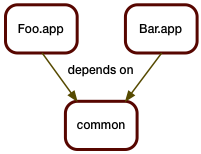
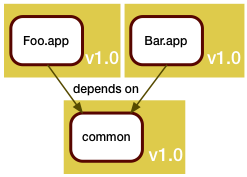
To demonstrate the challenges involved with modern "agile" processes, let's take a relatively simple scenario: two applications or services, each depending on a piece of shared code.

In the good old days, this was somewhat of a no-brainer.  All pieces would live in the same source tree, and be built together.
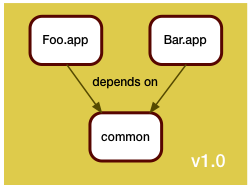

A single version control repository would be used, and a release consists of all components, built once.

A new release consists of rebuilding all pieces and delivering them as a unit.  So finding the difference between two releases was a pure version control system operation, and no additional thinking was required.
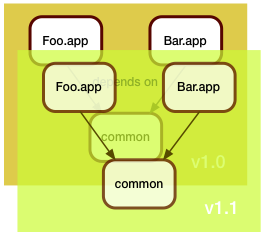

The challenge in the bad old days was that every single one of your customers probably had a different version of your system, and was both demanding in fixing their bugs, but refusing to upgrade to your latest release. Therefore you had to manage lots of patch branches.

Still, everything was within the confines of a single version control repository, and figuring out the deltas between two releases was essentially running:
 git log <old>..<new>
In the software as a service model, you don't have the patching problem. Instead, you have the challenge of getting your fixes out to production as fast and as safely as possible.
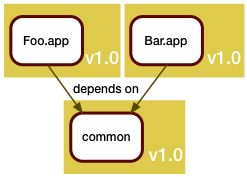
The mantra here is: if it ain't broke, don't fix it. As we've seen before, rebuilding and re-releasing an unchanged component already can have risks, and forcing a working component to be rebuilt because of unrelated changes will at least cause delay.

So, to support the new world, we split our single version control repository into separate repositories, one for each component. The components get built separately, and can be released separately.
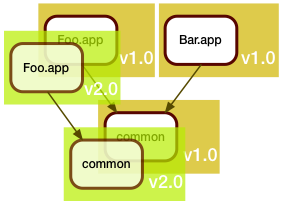
In this example, Foo.app got updated. This update unfortunately also required a fix to the shared code library. Arguably, Bar.app should be rebuilt to see if the fix broke it, but we are in a hurry (when are we ever not in a hurry?), and since Bar.app is functioning fine as is, we don't rebuild it. We just leave it alone.

As we deploy this to production, we realize we now have two different versions of common there.

That in itself is usually not a problem if we build things right, for example by using "assemblies", using static linking, or just paying attention to the load paths.

I sometimes joke that the first thing everyone does in a C++ project is to override new. The first thing everyone does in a Java project is to write their own class loader. This scenario explains why.

But with this new process, answering the question of "What's new in production?" is no longer a simple version control operation. For one, there isn't a single repository anymore - and then the answer depends on the service or application you're examining.

In this case, the answer would be:
Bar.app: unchanged
Foo.app: git log v1.0..v2.0 # in Foo.app's repo
         git log v1.0..v2.0 # in common's repo
In order to divine this somehow, we need to register the exact revisions used for every piece of the build. I personally like build manifests embedded someplace in the deliverable items. These build manifests would include all the dependency information, and would look somewhat like this:
{ "Name": "Foo.app",
  "Rev":  "v2.0",
  "Includes": [ { "Name": "common",
                  "Rev":  "v2.0" } ] }
The same idea can be used to describe the state of a complete release. We just aggregate all the build manifests into a larger one:
{ "Name": "January Release",
  "Includes: [{ "Name": "Foo.app",
                "Rev":  "v2.0",
                "Includes": [{ "Name": "common",
                               "Rev":  "v2.0" }]}
,
              { "Name": "Bar.app",
                "Rev":  "v1.0",
                "Includes": [{ "Name": "common",
                               "Rev":  "v1.0" }]}]}
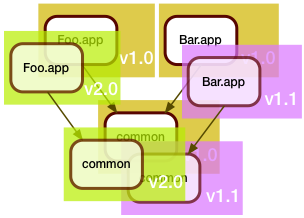
Now the development team around Bar.app wasn't idle during all this time, and they also came up with some changes. They too needed to update the shared code in common.

Of course, they also were in a hurry, and even though they saw that the Foo.app folks were busy tweaking the shared code, they decided that a merge was too risky for their schedule, and instead branched the common code for their own use.

When they got it all working, the manifest of the February release looked like this:
{ "Name": "February Release",
  "Includes: [{ "Name": "Foo.app",
                "Rev":  "v2.0",
                "Includes": [{ "Name": "common",
                               "Rev":  "v2.0" }]}
,
              { "Name": "Bar.app",
                "Rev":  "v1.1",
                "Includes": [{ "Name": "common",
                               "Rev":  "v1.1" }]}]}
It should be easy to see how recursive traversal of both build manifests will yield the answer to the question "What changed between January and February?":
Foo.app: unchanged
Bar.app: git log v1.0..v1.1 # in Bar.app's repo
         git log v1.0..v1.1 # in common's repo
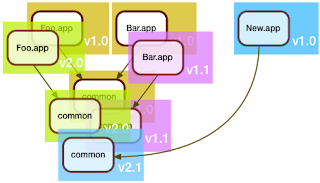
So far, this wasn't so difficult.  Where things get interesting is when a brand new service comes into play.

Here, the folks who developed New.app decided that they will be good citizens and merge the shared code in common. "Might as well", they thought, "someone's gotta deal with the tech debt".

Of course, the folks maintaining Foo.app and Bar.app would have none of it: "if it ain't broke, don't fix it", they said, and so the March release looked like this:
{ "Name": "March Release",
  "Includes: [{ "Name": "Foo.app",
                "Rev":  "v2.0",
                "Includes": [{ "Name": "common",
                               "Rev":  "v2.0" }]}
,
              { "Name": "Bar.app",
                "Rev":  "v1.1",
                "Includes": [{ "Name": "common",
                               "Rev":  "v1.1" }]},
 
             { "Name": "New.app",
                "Rev":  "v1.0",
                "Includes": [{ "Name": "common",
                               "Rev":  "v2.1" }]}
]}
So, what changed between February and March?
Foo.app: unchanged
Bar.app: unchanged
New.app: ????
The first part of the answer is easy. Since New.app's repository is brand new, it only makes sense to include all changes.
Foo.app: unchanged
Bar.app: unchanged
New.app: git log v1.0 # in New.app's repository
         and then ????
One can make a reasonable argument that from the point of view of New.app, all the changes in common are also new,  so they should be listed. In practice, though, this could be a huge list, and wouldn't really be that useful, as most changes would be completely unrelated to New.app, and also would be unrelated to anything within the new release. We need something better.

I think the best answer is: "all changes between the oldest change seen by the other apps, and the change seen by the new app". Or another way to put it: all changes made by the other apps that are ancestors of the changes made by the new app. This would be:
Foo.app: unchanged
Bar.app: unchanged
New.app: git log v1.0             # in New.app
         git log v2.1 ^v2.0 ^v1.1 # in common
But how do we code this?

A single recursive traversal of the build manifests is no longer enough. We need to make two passes.

The first pass will compare existing items vs existing items, each registering the revision ranges used for every repository.

The second pass processes the new items, now using the revision ranges accumulated in the first pass to generate the appropriate git log commands for all the dependencies of each new item.

This method seems to work right in all the corner cases:
  • If a dependency is brand new, it won't get traversed by any other app, so the list of revisions to exclude in the git log command (the ones prefixed with ^) will be empty, resulting in a git command to list all revisions - check.
  • If the new app uses a dependency as is, not modified by any other app, then the result will be revision ranges bound by the same revisions, thereby producing no new changes - check.
I think this method produces reliable changeset information, and allows me to use git commit comments as the primary source of truth on what actually changed. Combining this with conventions to include issue tracker references in git commits, and hooks to validate the references will go a long way towards automating the release process.

Notes:
  • In the examples here, I used tags instead of git revision hashes. This was simply done for clarity. In practice, I would only ever apply tags at the end of the release process, never earlier. After all, the goal is to create tags reflecting the state as it is, not as it should be.
  • The practice of manually managing your dependencies has unfortunately become quite common in the java ecosystem. Build tools like maven and ivy support this process, but it has a large potential to create technological debt, as the maintainers of individual services can kick the can down the road for a long time before having to reconcile their use of shared code with other folks. Often, this only happens when a security fix is made, and folks are forced to upgrade, and then suddenly all that accumulated debt comes due. So if you wonder why some well known exploits still work on some sites, that's one reason...
  • Coding the traversal makes for a nice exercise and interview question. It's particularly tempting to go for premature optimization, which then comes back to bite you. For example, it is tempting to skip processing an item where the revision range is empty (i.e. no change), but in that case you might also forget to register the range, which would result in a new app not seeing that an existing app did use the item...
  • Obviously, collecting release notes is more than just collecting commit comments, but this is, I think, the first step. Commit comments -> Issue tracker references -> Release Notes. The last step will always be a manual one, after all, that's where the judgement comes in. 

Tuesday, April 2, 2013

What Is vs What Should Be

Along the lines of "What is it We Do Again?":
  • Product Management is all about what should be;
  • Release Management is all about what is.
It is very easy to get the two confused. For example:
  • You build a piece of software after a developer commits a fix. The bug should be fixed. Is it?
  • You deploy a war file to a tomcat server. The service should be updated. Is it?
  • ...
It is very easy for release managers to go and push buttons, and then infer that the buttons did their job - and 99% of the time they will be correct, but every once in a while, things break.

It's therefore very important to always locate the source of truth for any statement you wish to make.

For example, in my previous post describing my tagging process, I do something which appears to be bizarre: I go and retrieve build manifests from the actual production sites and use those as my source of truth for tagging the source trees.

The reason I do it that way is that I have a fairly bullet-proof chain of evidence to prove that the tagged revisions truly are in production:
  • The build manifests are created at build time, so they reflect the revisions used right then;
  • The build manifests are packaged and travel along with every deploy;
  • The build manifests can only get to the target site via a deploy;
  • The build manifests contain hash signatures that can be run against the deployed files to validate that the manifest matches up with the file.
So, retrieving a build manifest from the production site gives me very high confidence that the revisions referenced are in production.

Consider common alternatives:
  • Tag at build time. Problem becomes identifying the tag actually deployed to production - so this doesn't really solve anything.
  • Rebuild for deploy. Problem becomes identifying the source tree configs used by QA. In addition, can you really trust your build system to be repeatable?
My method of relying on what is gives our QA team a wide variety of options on how to proceed:
  • They can release pieces incrementally as they pass QA;
  • They can try different combinations of builds;
  • They can roll back to previous builds;
Now there is a problem still: it might take a while to collect the truth, and as we saw with in the tagging of shared code, the truth can be quite messy at time. Hence the importance of timestamping your data, so at least you can say "this was the truth as of yesterday at noon".

The complexity of modern software as a service environments isn't going away, and we will need to get used to the idea of many versions of the same thing co-existing in a single installation. The fewer assumptions made in the process of presenting the state of these installations, the better.